An assistant that
did the reading.
Every other AI starts the conversation knowing nothing about your company. This one has read the channel, the ticket, the mail thread and the wiki page, and tells you which one each sentence came from.
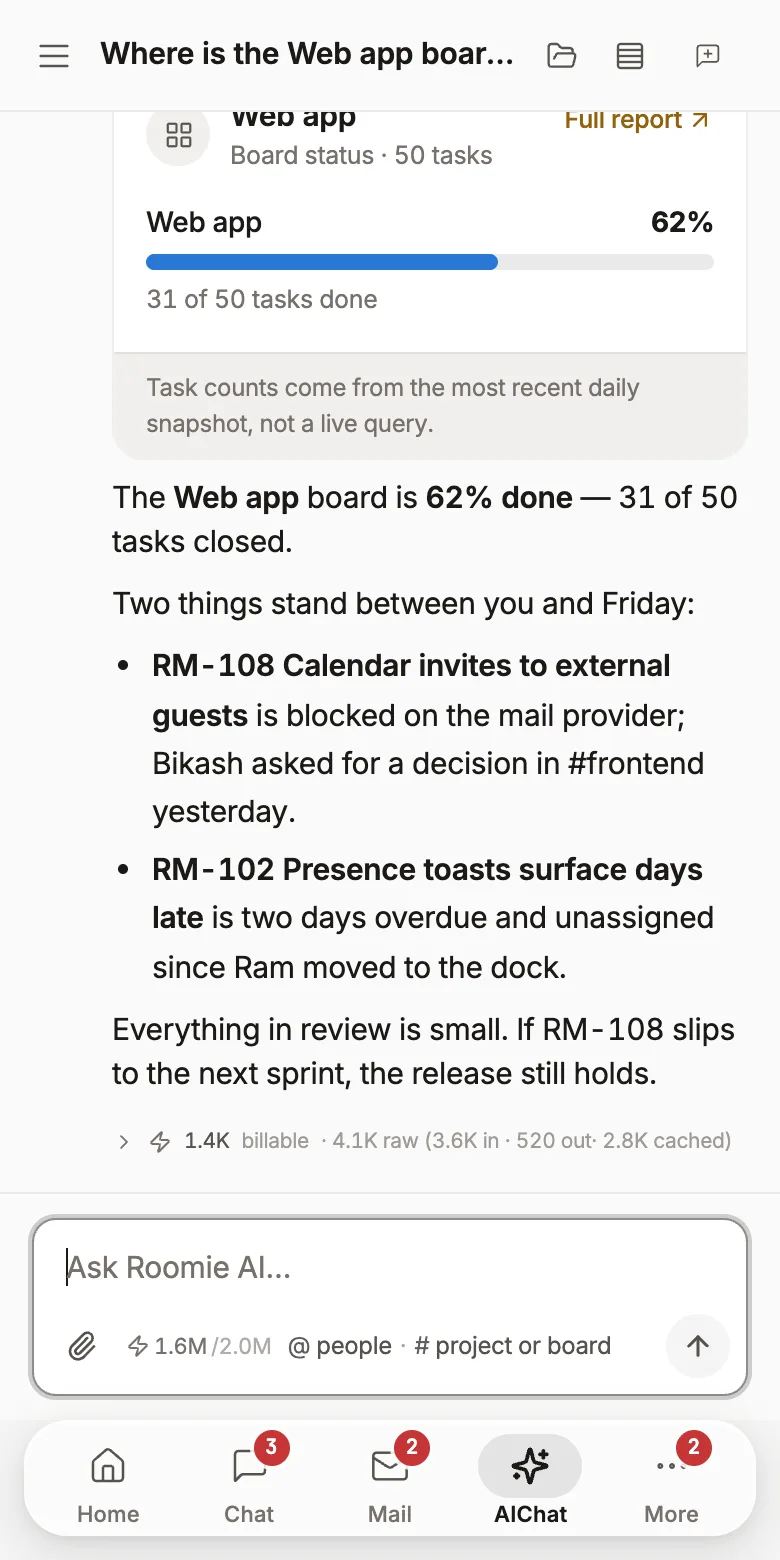
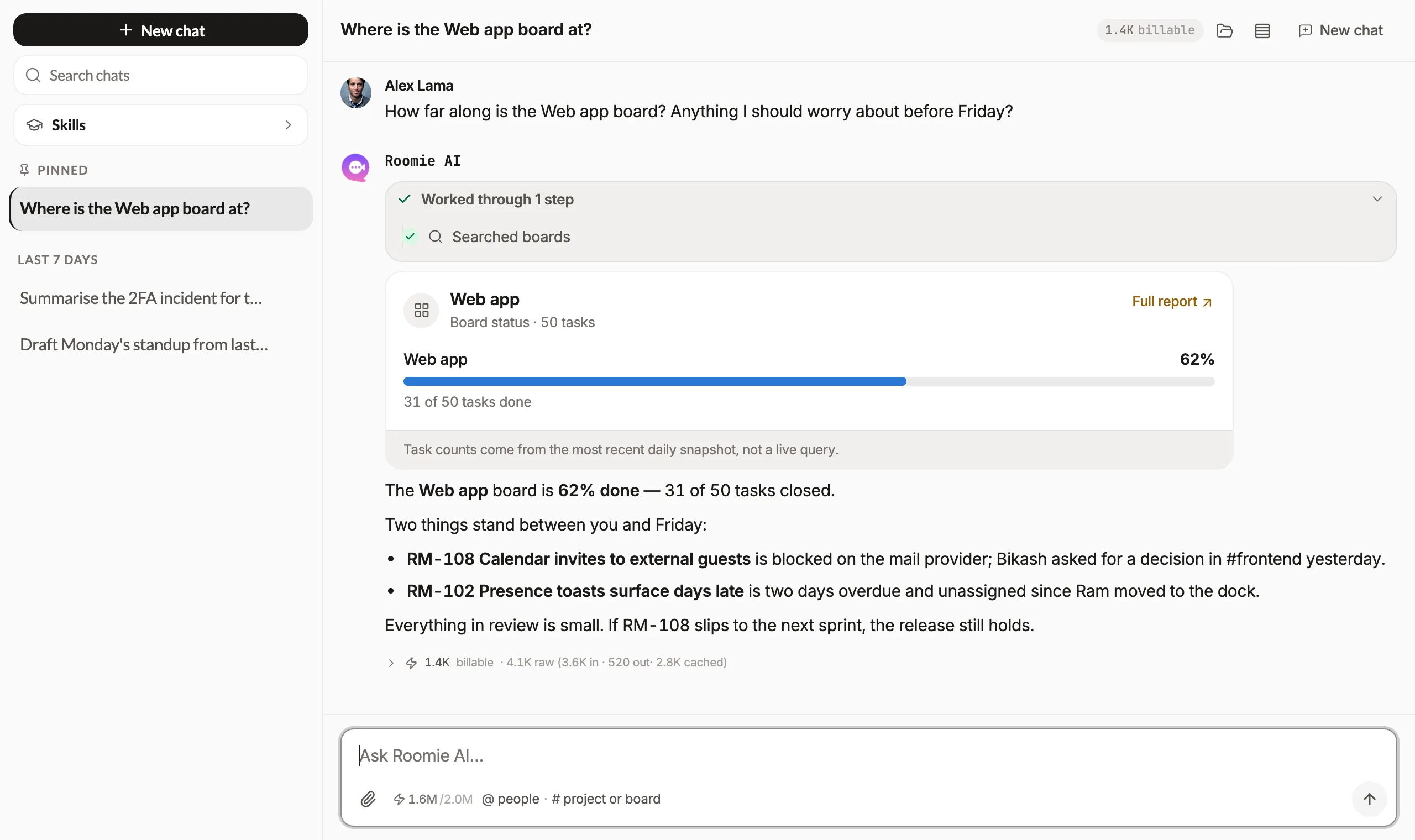
An answer you can check in one click
Confident prose about your own company is worthless if you can't tell whether it happened. Every answer carries the rooms, tickets and mails it was built from, so the first thing you can do with it is verify it, and the second is act on it.
- Sources on every claim, not a footnote at the end
- If the workspace doesn't say, it says it doesn't know
- Nothing is sent or published on your behalf
Mention it where the work is happening
You don't have to go to a separate AI page. Name Roomie in a channel and it answers there, with everyone watching: which also means everyone can see what it got wrong, and correct it in the thread.
- Files the ticket from the message that described the bug
- Summarises a long thread for whoever just joined it
- Answers in the room, so the answer is searchable later
Useful, and bounded on purpose
The capabilities are narrow by design. An assistant with your company's data should be easy to describe in one sentence.
Every answer names its sources
The room, the ticket, the mailbox. An assistant over your company's data is only useful if you can check it, so checking is one click.
It reads what you can read
Permissions are the workspace's. A question can't surface a room you're not in or a project you're not on. There's no admin index that sees everything.
Turns talk into work
“File that as a bug” creates the ticket in the right project, on the right person, with the conversation linked.
Catch-up in a paragraph
What moved while you were away, in the order that matters, instead of three hundred unread messages and a guess.
Triage on the support desk
Groups conversations that are one incident, answers the repeat questions from your help centre, and flags the rest to a person.
Drafts, never sends
It writes the reply, the release note or the incident write-up as a draft. A person publishes it. That line doesn't move.
Or point Claude at it instead
Roomie is an MCP server. Connect Claude, ChatGPT or any MCP client and it reaches the same workspace, with your permissions: reading rooms, searching tickets, creating work. The workspace is the data layer; the model is yours to choose.
How the MCP connection works →Roomie's AI vs a general assistant
ChatGPT is a better general reasoner and always will be. The difference is what it can see.
The AI features are the one thing self-hosting doesn't include. They run on our inference, or on your own key.
Free for 3 users, then $2 per user a month (NPR 250 · eSewa, FonePay, Khalti). Every feature on this page included.
Self-hostingRoomie's AI, answered
What can the AI see?
Only what you can. It searches the projects, rooms and pages you are a member of, so it cannot surface something from a space you have no access to.
Does it show where an answer came from?
Yes. Answers link to the messages, tickets, pages and boards they were drawn from, and reports such as board or sprint status are shown as cards you can open.
Can it do things, or only answer?
It can act, with your approval: create and update tasks, draft wiki pages, build or edit a website page. For larger jobs it shows a plan first and waits for you to approve it.
Can I use my own AI tools with Roomie?
Yes. Roomie exposes an MCP server, so Claude, ChatGPT and other MCP clients can read and update your workspace with your permissions.
Is AI included in the price?
Yes. Each workspace has a monthly AI allowance included, and you can add more if you need it. Roomie is free for up to 3 users. After that it is $2 per user per month (NPR 250 in Nepal), and that one price covers every part of the workspace. There is no separate charge for this.
The rest of the workspace
Every one of these is included, and they all know about each other.
A PM, sales rep or marketer that asks, then acts
Team chatThreads, huddles, and messages that become tickets
Custom domain emailUnlimited mailboxes on your own domain
CRMDeals, a shared inbox, quotes and invoices
Tasks & ticketingSprints, boards, releases and ticket types
Virtual officeSee who's around and walk up to them
Customer supportAn embeddable widget and a shared inbox
Website builderShip a site and a blog on your own domain
Wiki & docsSpaces, pages and live co-editing
Coding agentReads your repo, shows the diff, runs the check
MCP for AI agentsConnect Claude or ChatGPT to the workspace
Ask it something about your own week
It gets useful the moment there's a week of work in the workspace to read.