Agent Todo - The Board Stage I Added Because I Kept Losing Track of My AI

Running coding agents all day left me with a pile of pull requests and no memory of which was which. Three board stages fixed it - Agent Todo, Agent Working and Agent done, right after Todo. They worked well enough that they are now part of the default workflow for new Roomie projects. Here is the problem they solve, and why it is not really about kanban.
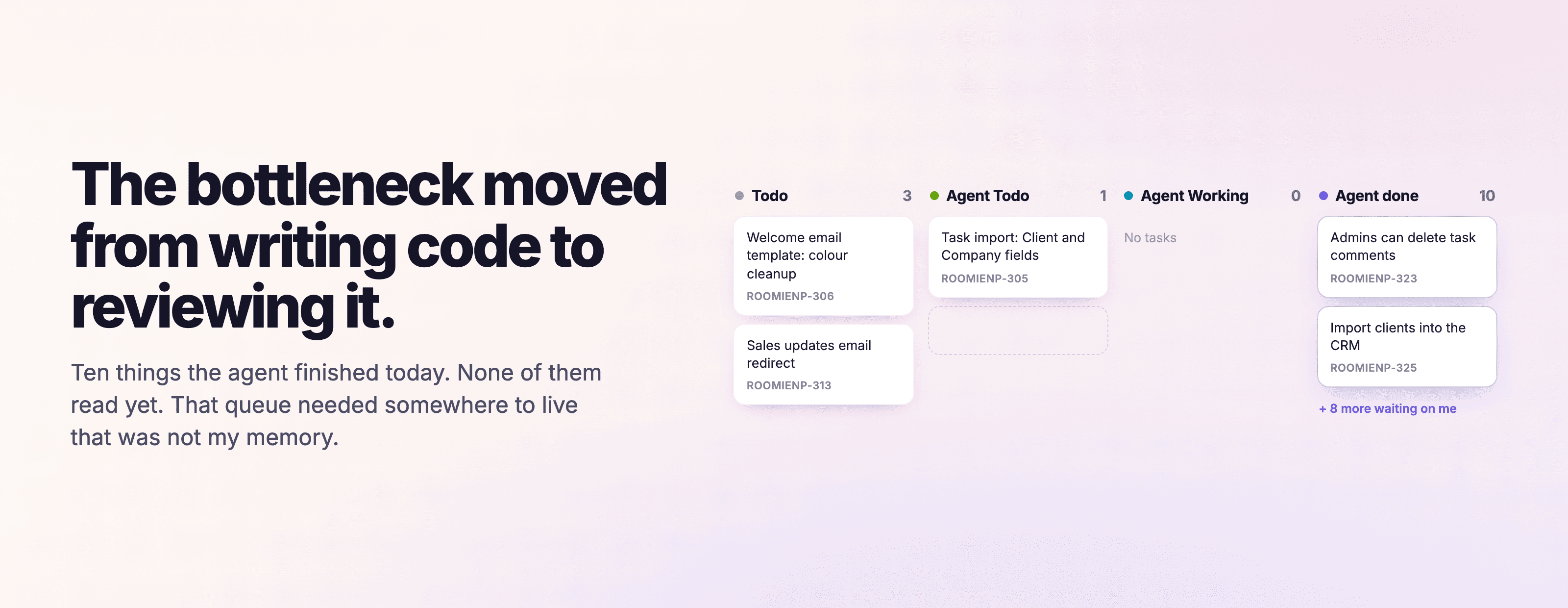
This started as a small thing I did for myself, not a product decision.
I had been running coding agents for most of the day. By evening there were pull requests open that I had asked for at some point, and I could not reliably tell you which one was which. I knew roughly what I had delegated. I could not tell you what had come back, what I had already looked at, or what was sitting there waiting on me.
So I added three stages to my own board, right after Todo: Agent Todo, Agent Working and Agent done.
It is not a clever idea. It took about a minute. But I stopped losing things, and it kept being obviously better, so this afternoon we shipped it: Agent Todo is now part of the default workflow for new Roomie projects, the same way Todo is. Existing projects keep whatever workflow they already have, because quietly rearranging a board someone is working on is not a favour.
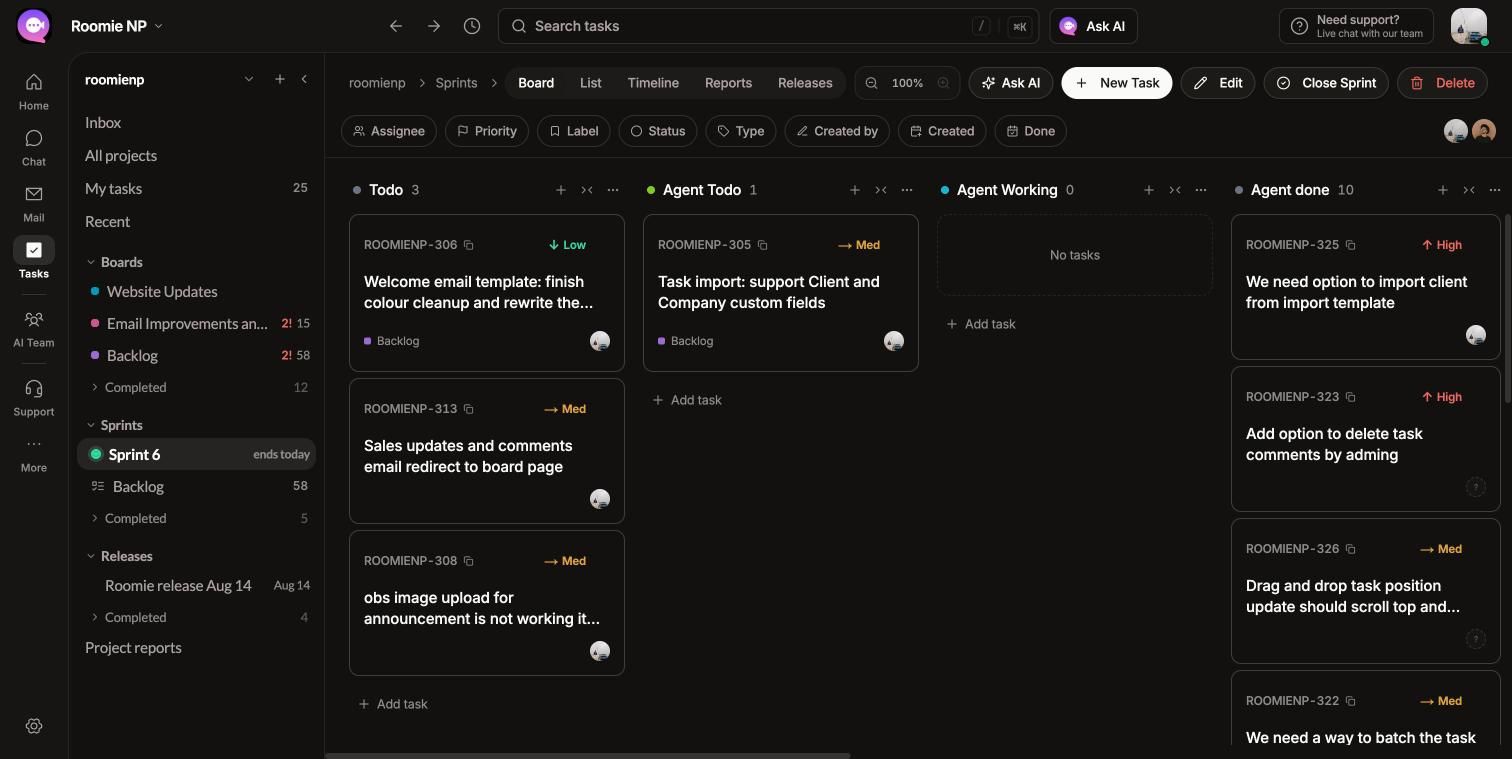
The end of an actual day. Three things I have not started, one queued for an agent, nothing running, and ten finished pieces of work with my name on the review.
The Real Problem Is Not Organisation
It would be easy to write this up as "stay organised while using AI" and miss what actually happened.
Here is what changed. For my whole career, the slow part of building software was producing it. Writing the code, making the thing. Review was the fast part - a few minutes at the end of something that took hours.
Agents inverted that. Producing a change is now cheap and fast. Reviewing it is not, because reviewing still runs at human speed and still needs me to hold the whole context in my head.
The bottleneck moved. It used to be my hands. Now it is my attention.
And once you see it that way, the pile of pull requests is not a tidiness problem. It is a queue. A real queue, with things arriving faster than they are being served, which is exactly the kind of thing you are supposed to measure and manage. Except this one was invisible.
Why a Normal Board Hides It
Every board I have used assumes a human did the work.
The stages encode that assumption. Todo means nobody has started. In Progress means a person is actively on it. Done means it is finished and shipped. The implied next step after In Progress is "it goes out", because the person who built it is the person who checked it as they went.
When an agent did the work, there is a step in the middle that none of those stages describe: finished, but no human has looked at it yet.
That state does not fit anywhere. So you either leave the task in In Progress, which is a lie because nothing is progressing, or you move it to Done, which is a worse lie because nobody has read it. Most people do neither and the work just lives in the pull request list instead.
That is the failure. The queue exists either way. The board just was not showing it to me, so the only place it accumulated was my memory, and my memory is bad after six hours of context switching.
What the Three Stages Do
Agent Todo is work I have decided to hand to an agent but have not kicked off yet. It is my own intent, written down. Without it I was holding "I should get the agent to do that" in my head, which is the same bad place everything else was.
Agent Working is handed off and running. When something is in this stage, I know not to start it myself, and I know a result is coming that will need my eyes.
Agent done is the one that actually mattered. The agent has finished, there is a pull request, and no human has read it. This is the stage no normal board has, and it is the queue the whole problem was about. Everything else on this list is bookkeeping around it.
Then the normal review and done stages do what they always did.
The useful part is not the stages themselves. It is that the number in Agent done is information. The screenshot above says ten. That is ten finished pieces of work waiting on my attention specifically, not on anybody else and not on a machine. Before, that number existed but I could not see it, so I would cheerfully delegate another four and discover the backlog at midnight.
What Changed Day to Day
Honestly, the main thing is that I open the board in the morning instead of the pull request list.
The pull request list is sorted by time and tells you nothing about intent. A board column tells you what you were trying to do and where it got to. Six weeks later, the task still carries the reason it existed, which a branch name never does.
The second thing is smaller and I did not expect it. I got more willing to actually stop. When the review queue is visible and it is long, "I will look at this tomorrow" feels like a decision rather than a failure. When it was invisible, every unreviewed thing felt like something I was quietly getting wrong.
Why We Shipped It as a Default
We could have left it as a template, or a thing you add if you want. Boards already let you add any stage you like, so strictly speaking nothing new was needed.
We made it a default because the people who need it most are the ones who will not think to add it.
If you are already deep enough into running agents to have felt this problem, you would have built your own version eventually, the way I did. The person I want to catch is the one who starts using an agent next month, does not yet know the review queue is about to become their bottleneck, and would otherwise discover it the way I did - by losing track of things for a few weeks first.
Defaults are an opinion. This is ours: if your team is going to run agents, the work they produce needs somewhere to wait that is not your memory.
It only applies to new projects. If you already have a board you like, nothing moved.
I Do Not Know If This Is Right
I want to be straight about what this is. It is one person's workflow that worked well enough on my own board that we shipped it as a default the same day. It is not a methodology, and I have not tested it against alternatives.
Some things I am genuinely unsure about:
- Three stages might be one too many. Agent done earns its place without question. Agent Todo earns its place for me because I batch delegation, but if you kick things off the moment you think of them, it may just be noise.
- It may not survive a team. Everything here is about one person's attention. What happens when four people are delegating to agents against the same board is not something I have lived through yet.
- The naming may be wrong. The stages are named after what the agent is doing. "Awaiting review" would describe what I actually care about, which is what I still owe. I am not sure which is the better handle.
If you are running agents daily, I would like to know what you did instead. I have not seen many people talk about this part, which either means it is not a widespread problem yet, or it is and everyone is solving it privately in a notebook.
My bet is on the second one.
If You Want to Try This in Roomie
New projects get the agent stages already. If you want to change them, or add your own, workflows live on the project page rather than in global settings - open Projects, click your project, scroll past the member list to Workflows, and hit Manage.
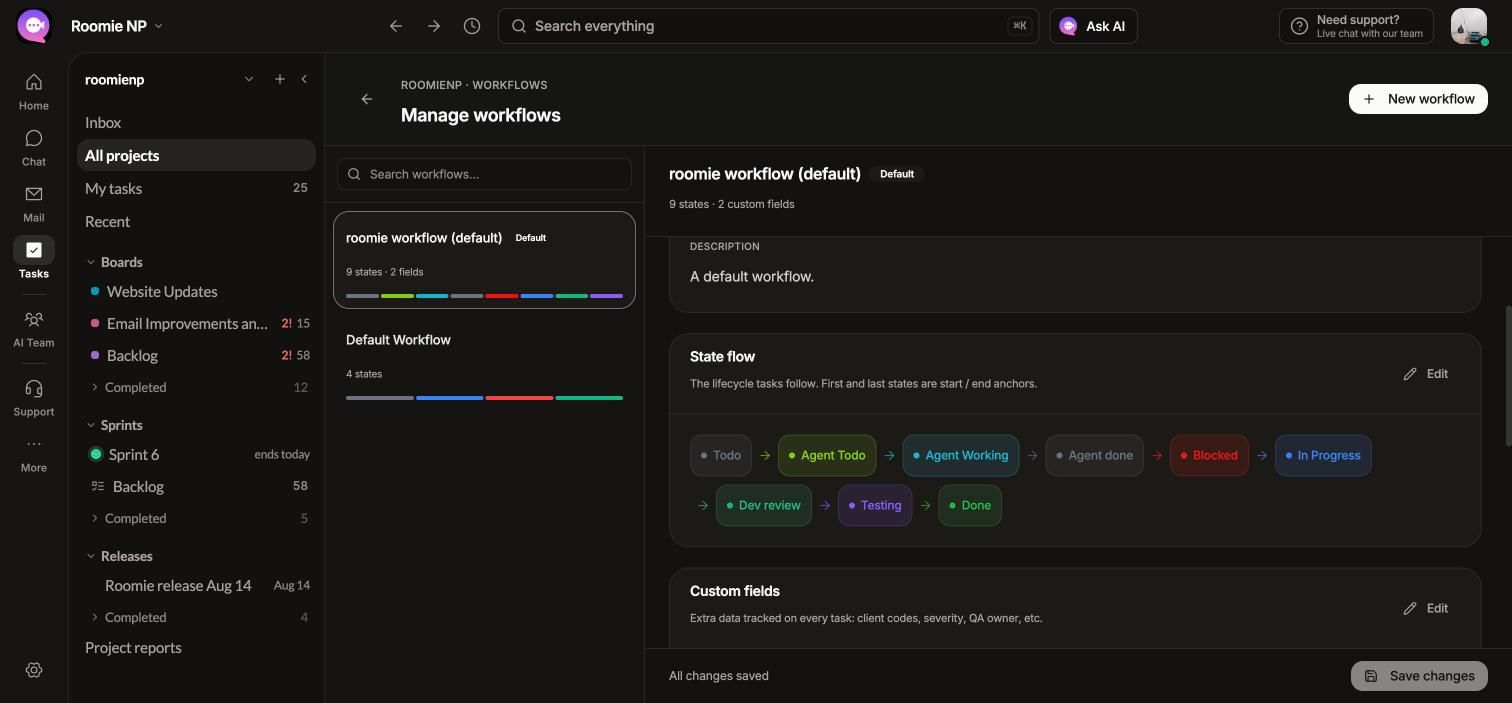
State flow is the row of stages, in order. The first and last are the start and end anchors, and everything in between is yours to name and reorder. Press Edit on that section to add a stage, rename one, or drag it somewhere else. Our default sits in the middle: Todo, then the agent stages, then the normal review and done stages.
A project can have more than one workflow. The list on the left shows each, with its state count, and one of them is marked Default - that is the one new tasks follow.
Custom fields are on the same page, just below the state flow.
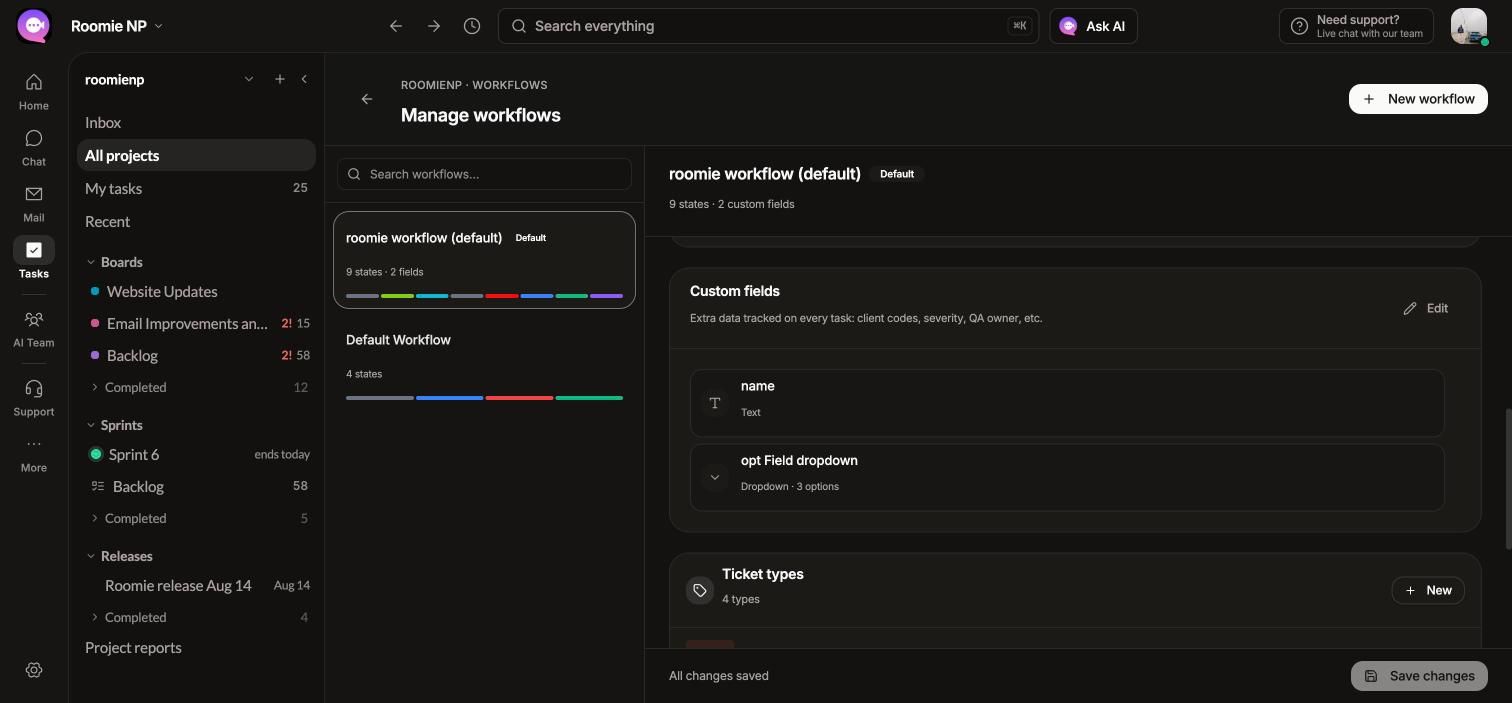
These are extra columns on every task in that workflow: a client code, a severity, a QA owner, whichever dropdown your team keeps rebuilding in a spreadsheet. Press Edit, add a field, pick its type, and for a dropdown give it its options. They then show up on the task and can be filtered on the board.
Two things worth knowing before you rearrange anything:
- Changing a workflow changes it for every task using it. If a stage disappears, the tasks sitting in it have to go somewhere, so plan the move before you make it.
- A new workflow is often safer than editing the default. If you want to try something unusual on one board, create a second workflow and point that project at it, rather than reshaping the one everything else depends on.